

Comprehensive excel Training | Practical and Complete Training
A Fascinating Journey into the World of excel
Imagine that within just a few weeks you gain the ability to work with tables, formulas, charts and data analysis — even though you have no prior knowledge of Excel! That is the secret behind this “Zero to Hero” excel training. If you have so far believed that learning excel is difficult, join me as we present a comprehensive and practical excel course — an engaging, exciting, and hands-on pathway for beginners through to professionals. At the end of this journey, you will not only have experienced “learning Excel at home,” but you will have become a professional user.

Why Learning excel is Essential?
In the data age, Excel is one of the primary tools for analysis, reporting, managing data and automating administrative and financial tasks. Virtually in every company, organization and small or large business, the need to use Excel is felt. With this comprehensive Excel training, you will:
Multiply your daily productivity
Acquire the ability to analyze data
Strengthen your resume and professional skills
Play an influential role in projects, tasks and administrative processes
If you want to begin learning Excel at home, this article is your complete guide.
Structure of the Zero to Hero excel Training Course
Below we outline the key sections of this training path:
1. Excel Fundamentals — Excel Training for Beginners
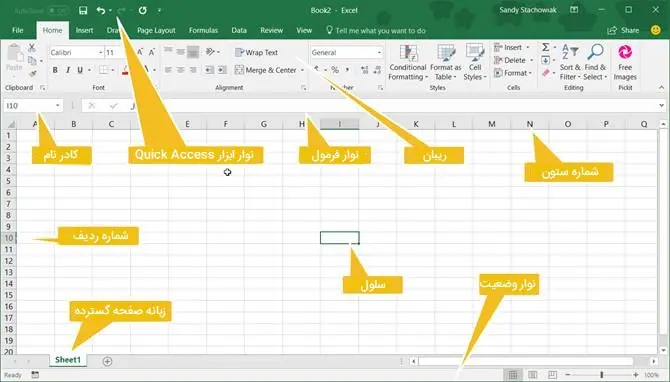
Familiarising with the Excel environment: ribbon, toolbar, cells
Entering and editing data: numbers, text, dates
Saving and opening files; selecting and moving cells
Concepts of rows and columns, cell range, basic formatting
At this stage, without any background you enter Excel and the elementary Excel training begins.
2. Basic Formulas and Functions — Practical Excel Training
SUM, AVERAGE, COUNT
Conditional functions: IF, AND, OR
Lookup & reference: VLOOKUP, HLOOKUP, INDEX, MATCH
Date & time functions, unit conversions
3. More Complex Formulas and Combined Functions — Advanced Excel Training
Text functions: LEFT, RIGHT, MID, CONCATENATE
Financial and logical functions
Array functions
Advanced conditional calculations using SUMIFS, COUNTIFS
4. Conditional Formatting, Tables and Filtering
Conditional Formatting to highlight data
Excel Table (smart table), naming ranges
Filter, sort, advanced filter
5. Charts and Data Visualisation
Selecting the appropriate chart type
Setting titles, labels, colours
Combination charts, pie charts
Sparklines and visualising small trends
6. Data Analysis Tools
Pivot Table, calculating pivot values
Calculated Fields
Filtering in pivot tables, hierarchy tree
Pivot Chart
7. Advanced Tools and Automation
Macros and introductory VBA
Recording macros and editing code
User-Defined Functions (UDF)
Connecting to external data (CSV, Access, web connection)
Using Power Query
Using Power Pivot for data modelling
8. Practical Project and Final Exercise
Undertaking a real-world project: sales analysis, financial report, dashboard
Combining several of the above sections in one project
Troubleshooting and consultation
Vital Tips for Fast and Successful Learning
Move step by step: learning Excel from zero to hero means starting with basics and gradually increasing the level.
Practice continuously: without practising the concepts, they will quickly be forgotten. For each lesson work on real examples.
Build real projects: try analysing your own work or personal data with Excel.
Analyse errors: if a formula doesn’t work, examine and correct the reasons.
Use supplementary resources: videos, blogs, forums.
Learn Excel at home: with a regular schedule, allocate daily time for learning.
Participate in challenges and group projects: share experiences and solve problems together.
How to Get the Most from This Course?
Follow a daily or weekly timetable.
Do each topic together with practical examples.
Write down your questions and search for answers.
Practice with real tools like actual CSV files.
Save your results and build charts and reports.
After each module, perform a quick review.
Why This Training Stands Out from the Rest?
Comprehensive and from zero to hero: no prior knowledge needed.
Practical and project-oriented: all examples are real and hands-on.
Suitable for all levels: from beginners to professionals.
Learn at home friendly: easy access and personal practice.
Support and guidance: possibility of asking questions and troubleshooting throughout.
Frequently Asked Questions (FAQ)
Q1: Is this course suitable for me if I know nothing about Excel?
Yes — the course starts with basic concepts and in later parts covers advanced topics. Excel training for beginners is one of the key phrases of the course.
Q2: How long is the excel training?
Depending on effort and time, typically between 4 to 8 weeks to complete the entire course.
Q3: Do I need prior mathematics or statistics knowledge?
No — simple math concepts required are taught within the course.
Q4: Will I receive a certificate or credential at the end of the course?
Yes — at the end of the course, a certification of completion is issued.
Q5: Are additional resources such as practice files provided?
Yes — practice files, projects and supplementary resources are included.
Q6: How can I ask my questions?
After each lesson the possibility of sending questions exists and the course support team will respond.
Q7: Is this course suitable for professional users?
Yes — parts of the course are devoted to advanced Excel training, macros and VBA or Power Query.
Contact Us
If you have any questions, need guidance or consultation, we are happy to connect with you:
Email: kimia1380rastegar@gmail.com
Phone: 09019812743
Office Address: Fars, Shiraz, Maali Abad, Dr Shariati Street
Telegram / WhatsApp: 09019812743

Final Summary: From Zero to excel Hero
Learning Excel from zero to hero is the path that transforms you from a novice into a capable user. This comprehensive Excel training and practical Excel course helps you quickly grasp concepts and apply them in real projects. Follow the path with enthusiasm, practise, and leave your worries behind—because at the end of this road, you will be the most professional Excel user.
Start today: your access key to the world of data and analytics is in your hands!