
Everything About Microsoft Word | From Zero to Hero
🔹 What is Microsoft Word and Why Is It So Important?
If you’ve ever used a computer, you’ve definitely heard of Microsoft Word — one of the most widely used software programs in the world. Word is part of the Microsoft Office Suite and is designed for writing, editing, and formatting text-based documents.
From writing a simple letter to designing a professional resume or even an entire book, Word makes it possible with powerful tools like layout customization, tables, charts, images, headers, footers, automatic numbering, and more.
🪄 Word Basics for Beginners
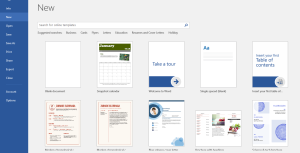
If you’re just starting out — don’t worry! Learning Word is easy and enjoyable. When you open the app, you’ll see a blank page called “Blank Document”. This is where your Word journey begins.
✅ Quick Tip:
Press Ctrl + N to create a new file and Ctrl + S to save it instantly.

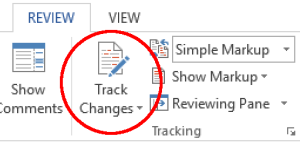
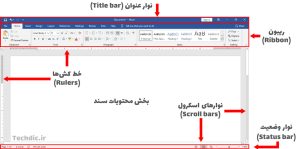
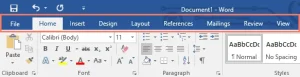
At the top, you’ll find the Ribbon, containing tabs like Home, Insert, Design, Layout, and Review — each with unique tools and options for document customization.
💡 Pro Tricks Every Word Expert Should Know
1. Convert Text to Table Quickly:
Select your text → Go to Insert > Table > Convert Text to Table.
2. Translate Without Leaving Word:
Go to Review > Translate and Word will translate the text instantly.
3. Insert Math Equations:
Use Insert > Equation to type complex formulas.
4. Add a Digital Signature:
From Insert > Signature Line, add your custom signature to any file.
5. Remove Extra Spaces in Seconds:
Use Find & Replace to search for double spaces and replace them with single spaces.
✨ Hidden Features You Probably Didn’t Know
Word isn’t just for typing — it’s a complete document design tool!
You can:
Design professional covers and report pages
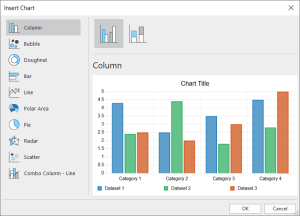
Insert SmartArt, tables, and charts
Perform spell and grammar checks automatically
Add links, videos, and images
Save in multiple formats like PDF, DOCX, HTML, and TXT
Use collaboration mode to edit with others in real-time
📘 Golden Tip: Always save your final files as PDF to avoid layout issues on other systems.
🎨 How to Design a Professional Document in Word
To make your document visually stunning:
1. Choose a color theme from Design tab
2. Adjust margins and page size under Layout
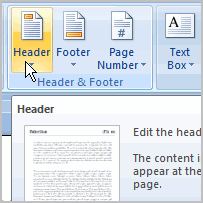
3. Add headers and footers using Insert > Header & Footer
4. Create a cover page from Insert > Cover Page
✨ These steps instantly turn any plain file into a polished, professional project.
⌨ Learn to Type Faster and Cleaner
To type efficiently in Word:
Use Tab for indentation.
Adjust line spacing from Home > Line and Paragraph Spacing.
Apply consistent formatting with Styles.
Use shortcuts:
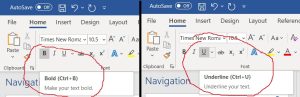
♠Ctrl + B: Bold
♦Ctrl + I: Italic
♣Ctrl + U: Underline
📌 Quick Tip: Use Heading 1, 2, and 3 styles so your titles automatically appear in the Table of Contents.
🧠 Expert-Level Tips and Tricks
Insert current date automatically: Insert > Date & Time
Prevent accidental deletions: Enable AutoSave
Create automatic Table of Contents: References > Table of Contents
Spell check your document: Press F7
Add watermark or logo: Design > Watermark
✍ Editing Like a Real Editor
Editing isn’t just deleting text — it’s about managing collaboration and structure.
Track Changes: see who edited what.
Comments: leave side notes for your team.
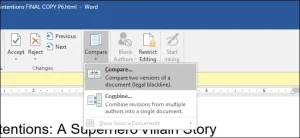
Compare: check differences between two versions.
💡 Tip: Always turn on Track Changes when working with a group.
🚀 Fast Learning Roadmap to Become a Word Expert
1. Practice typing for 20 minutes daily.
2. Watch Word tutorials or read “Word from Zero to Hero” guides.
3. Create small document projects.
4. Use ready-made templates for inspiration.
5. Learn one new trick every day!
💬 Final Thoughts: Word — A World of Possibilities
Microsoft Word isn’t just a text editor — it’s a creative tool for building ideas.
By mastering its tricks, design tools, and editing options, you can turn from a casual user into a true expert.
Start learning today and unlock endless opportunities in education, business, and content creation!
🌐 About Tegarat Farahoosh | International Digital Marketing Agency
Tegarat Farahoosh is a leading digital marketing and IT company specializing in innovative solutions for businesses worldwide.
Our services include:
💻 Website design (E-commerce, Corporate, Personal)
📱 Mobile app development (Android & iOS)
🧮 Accounting and management software
🚀 SEO and search engine optimization
📈 Digital marketing & advertising campaigns
With years of experience and a talented team, Tegarat Farahoosh has successfully executed numerous national and international projects — helping brands grow online and achieve visibility.
✨ If you’re looking for a professional team to handle everything from web design to digital marketing — Tegarat Farahoosh is your best choice.

📞 Contact Us
📧 Email: kimia1380rastegar@gmail.com
🌐 Website: webdigimarketing.ir
📱 Phone: 09019812743
📍 Address: Dr. Shariati St, Maali Abad, Shiraz, Fars, Iran
💬 You can also use our contact form — our experts will reply shortly!

❓ Frequently Asked Questions (FAQ)
1. What is Microsoft Word used for?
It’s a text processing software used for writing, editing, and designing professional documents — like reports, resumes, and books.
2. Is Word difficult to learn?
Not at all! Word is beginner-friendly, and most people can master its basic tools in just a few days.
3. What are the best Word shortcuts?
Ctrl + S (Save), Ctrl + N (New), Ctrl + B (Bold), Ctrl + I (Italic).
4. How can I save a Word document as PDF?
Go to File > Save As > Browse > Save as type: PDF.
5. Can I insert tables and charts?
Yes! Use Insert > Table or Insert > Chart for data visualization.
6. What does Track Changes do?
It shows all edits by different users — perfect for teamwork.
7. How can I make my document look professional?
Choose a design theme, adjust margins, and add headers, footers, and a cover page.
8. Is Word better than Google Docs?
Yes, it offers more offline features, advanced formatting, and full compatibility with plugins and templates.
9. Can I use Word on my phone?
Yes! Word is available for Android, iOS, and Office Online.
10. Can I design a resume or brochure in Word?
Absolutely — Word offers dozens of built-in templates for resumes, brochures, and more.